
Water Strikes

Updated: Sep 30
Water strikes are one of the most important observations in ground investigation. Recording exactly when and where groundwater is first encountered — and how it behaves afterwards — gives engineers critical information for foundation design, excavation planning, and environmental assessment.
What is a Water Strike?
A water strike is the point during drilling or excavation where groundwater is first encountered. The depth, time, and subsequent water level behaviour are all recorded.
The form writes to two AGS groups: WSTG (the strike itself) and WSTD (timed readings taken after the strike).
Recording a Water Strike (WSTG)
Tap Add Strike to open the strike form. Each strike records:
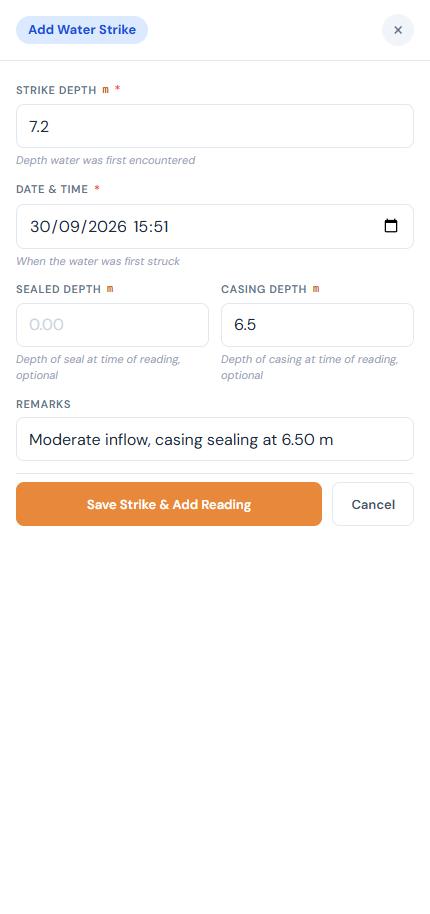
Strike Depth (WSTG_DPTH)
The depth at which water was first encountered, in metres. Required.
Date & Time (WSTG_DTIM)
When the strike occurred. Defaults to now. Required. Stored as an ISO datetime — this is important because the engineer needs to know the exact time to correlate with drilling activities.
Sealed Depth (WSTG_SEAL)
The depth at which the water-bearing layer was sealed off (e.g. by advancing casing past it), in metres. Optional.
Casing Depth (WSTG_CAS)
Depth of casing at the time of the strike, in metres. Optional but useful context.
Remarks
Free-text notes, e.g. 'Steady flow of water into hole' or 'Seepage only'. Optional.
Adding Readings (WSTD)
After saving a strike, the app prompts you to add a timed reading. Readings track how the water level changes over time after the initial strike.
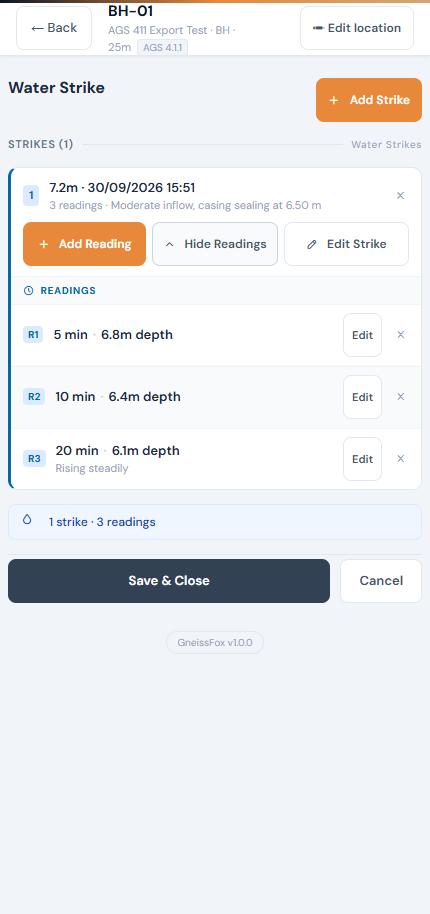
Each reading records:
Item | Description |
|---|---|
Minutes After Strike (WSTD_NMIN) | How many minutes after the strike this reading was taken. Required. |
Water Depth (WSTD_POST) | The depth to water at that time, in metres. Required. |
Remarks | Notes about the reading, e.g. 'Rising steadily'. Optional. |
You can add multiple readings per strike to track the water level over time — for example, at 5, 10, 15, and 20 minutes after the strike.
Multiple Strikes
A single location can have multiple water strikes at different depths. Each strike is shown as a card with its own set of readings. You can:
Item | Description |
|---|---|
Add Strike | Record another strike at a different depth. |
Add Reading | Add a timed reading to an existing strike. |
View Readings | Expand a strike card to see all its readings. |
Edit Strike | Modify the strike details. |
Edit / Delete Reading | Update or remove individual readings. |
Tips
Record the strike as soon as water is encountered — the time is important.
Take readings at regular intervals (e.g. every 5 minutes) to show whether the water level is rising, falling, or stable.
Note the casing depth — water strikes above casing depth are more reliable than those below, where water may have been introduced by drilling.
The sealed depth helps engineers understand whether a water-bearing layer has been isolated.
Multiple strikes at different depths may indicate separate water-bearing layers (aquifers).


Comments