
Variable Head Permeability Tests

Updated: Sep 30
Variable head permeability tests measure how quickly water flows through the ground around a borehole or standpipe. The result — the permeability coefficient (k) — tells engineers how easily water moves through the soil, which is critical for drainage design, dewatering, and contamination assessment.
How the Test Works
Water is either added to (falling head) or removed from (rising head) a standpipe installed in the borehole. Timed readings of the water level are taken as it returns to its natural rest level. The rate of change gives the permeability.
The form writes to four AGS groups: FGHG (test setup), FGHI (instrumentation), FGHS (test stages), and FGHT (timed readings).
Navigation
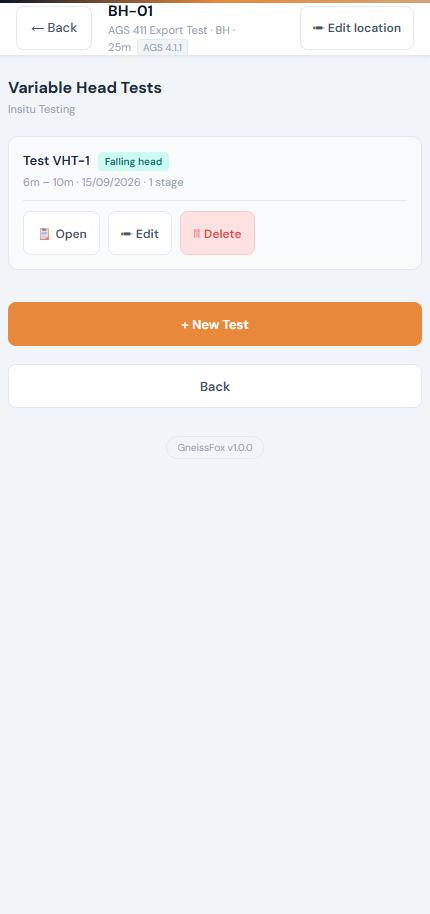
This form has a multi-level structure:
Item | Description |
|---|---|
Test List | View all tests at this location, create new ones, or open existing ones. |
Setup | Configure the test parameters. |
Stages | Each test can have multiple stages (e.g. rising and falling head). |
Readings | Timed water level readings within each stage. |
Results | Auto-calculated permeability for each stage. |
Test Setup (FGHG)
Item | Description |
|---|---|
Test Number | Auto-incremented. |
Date | When the test was performed. Required. |
Test Type | How water was displaced (e.g. falling head, rising head). Required. |
Configuration | The hole setup type. |
Depth Top / Base | The top and base of the slotted/response section in metres. Required. |
Standpipe Diameter | Internal diameter in mm (default 50). Used in the permeability calculation. |
Casing Depth | Bottom of casing in metres. |
Rest Water Level | Depth to water before the test, in metres. Required — this is the baseline the water level returns to. |
An optional Instrumentation section lets you record the dip meter or transducer details.
Stages (FGHS)
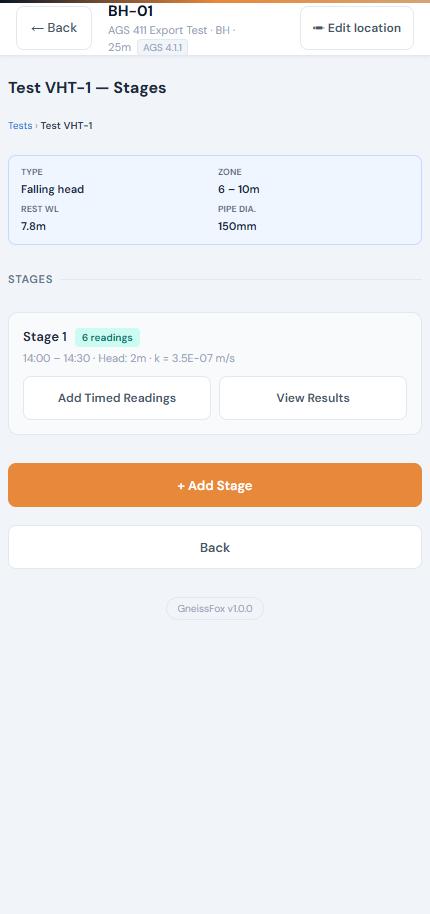
Each test can have one or more stages. A stage represents a single displacement event (e.g. one bail-out or one pour). When you add a stage, you can record:
Item | Description |
|---|---|
Applied Head | Height of water above rest level in metres. |
Start / End Time | When the stage began and ended. |
Remarks | Notes about this stage. |
Readings (FGHT)
Within each stage, take timed readings of the water level. Tap Stamp + New Row to add a reading with the current time pre-filled.
Each reading records:
Item | Description |
|---|---|
Time | When the reading was taken (24-hour clock). |
Depth | Depth to water in metres. |
Elapsed | Auto-calculated from the first reading. |
When you submit readings, the app auto-fills stage start/end times and calculates the permeability.
Results
After submitting readings, the Results page shows:
Item | Description |
|---|---|
Permeability (k) | Calculated using the Hvorslev method, displayed in m/s. |
Applied Head | Derived from the rest water level and the initial reading. |
Recovery | How much of the displaced water has returned to rest level. |
Reading Summary | Start/end times, duration, and number of readings. |
Tips
Always measure the rest water level accurately before starting — the entire calculation depends on it.
Take readings frequently at the start (when the level changes fastest) and less frequently as it stabilises.
The 'Stamp + New Row' button auto-fills the current time — just enter the depth reading.
Multiple stages let you run rising and falling head tests at the same depth for comparison.
The permeability result appears automatically once you have at least two readings in a stage.


Comments