
The Daily Record — Your Automatic Field Diary

Updated: Sep 30
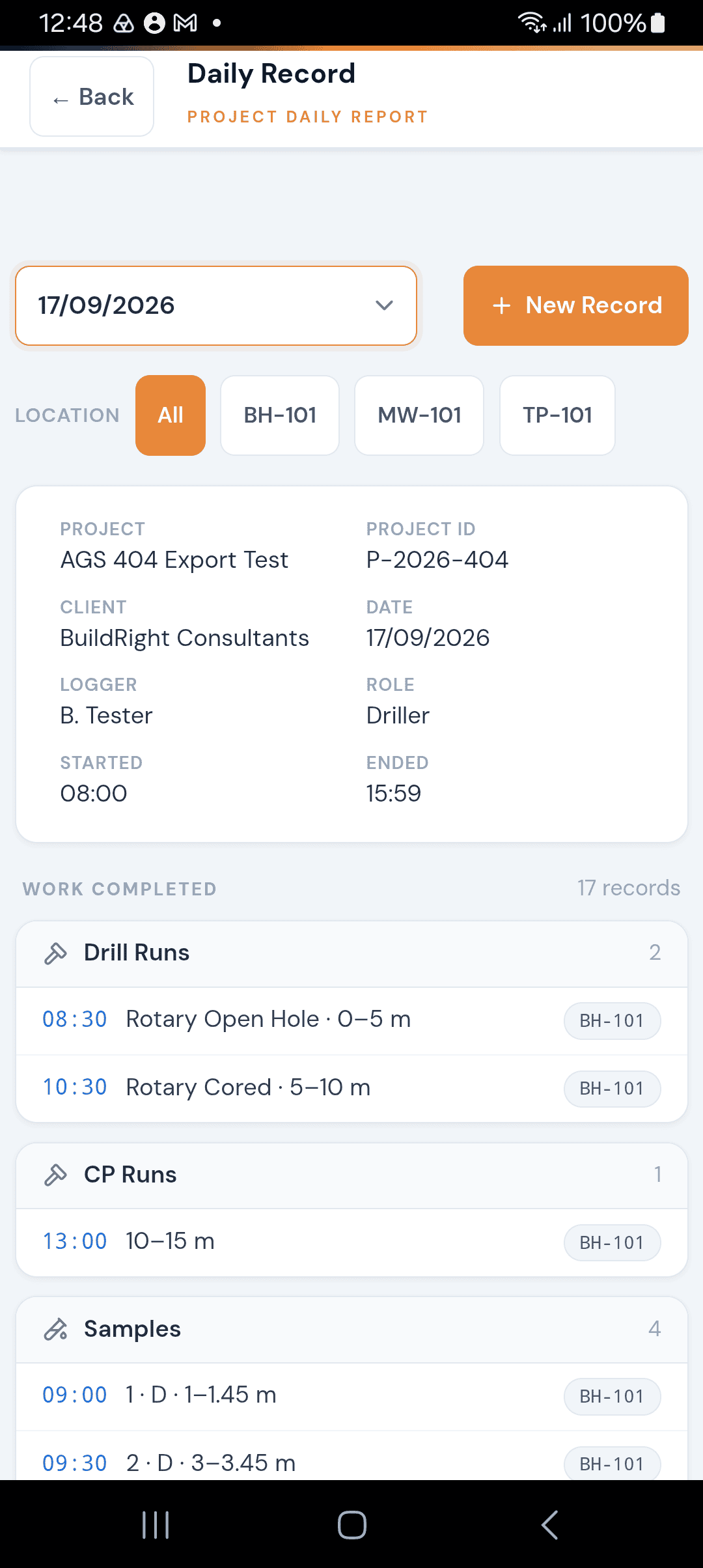
The Daily Record is a real-time summary of everything recorded during your shift. It is not a form you fill in — it is generated automatically from the data you enter throughout the day. Think of it as a live field diary that writes itself as you work.
What Gets Included
The Daily Record pulls together every piece of data created on the current date across all locations in the project. This includes:
Item | Description |
|---|---|
Drill Runs | Type, depth range, and time |
Cable Percussion Runs | Depth range |
Samples | Reference, type, depth range, and time |
SPT Results | Depth, type, and N-value |
DCP Tests | Test number and depth |
Dynamic Probe Tests | Probe type and start depth |
Water Strikes | Depth and time |
Chiselling | Depth range and time |
Core Information | Depth range, TCR, SCR, and RQD |
Geology | Depth range and description summary |
Detail Descriptions | Depth range and description summary |
Fracture Index | Reference, depth range, and fracture count |
Fracture Min-Mode-Max | Reference, depth range, and spacing values |
PID Readings | Depth and reading in ppm |
Hand Vane Tests | Depth and vane type |
Installations | Reference, type, and total depth |
Backfill | Depth range and material |
Variable Head Tests | Test type, depth range, and permeability result |
Monitoring Visits | Visit number, installation ref, gas and flow reading counts |
Inspection / Trial Pits | Pit type, dimensions, and method |
Photos | "Photo taken", what the photo shows, its depth and the photo's file name |
Each item shows the time it was recorded (converted to local time), a description line summarising the key values, and a location badge showing which borehole or pit it belongs to.
Photos are listed by file name rather than shown as pictures, for example "12:58 · Photo taken · Core box · 3–6 m · P-2026-411_BH-01_20260930_01.jpg". The file name matches the photo in your end-of-day export, so anyone reading the record can find the right image. See the Photos guide for how to take them.
Project Records & Location Records
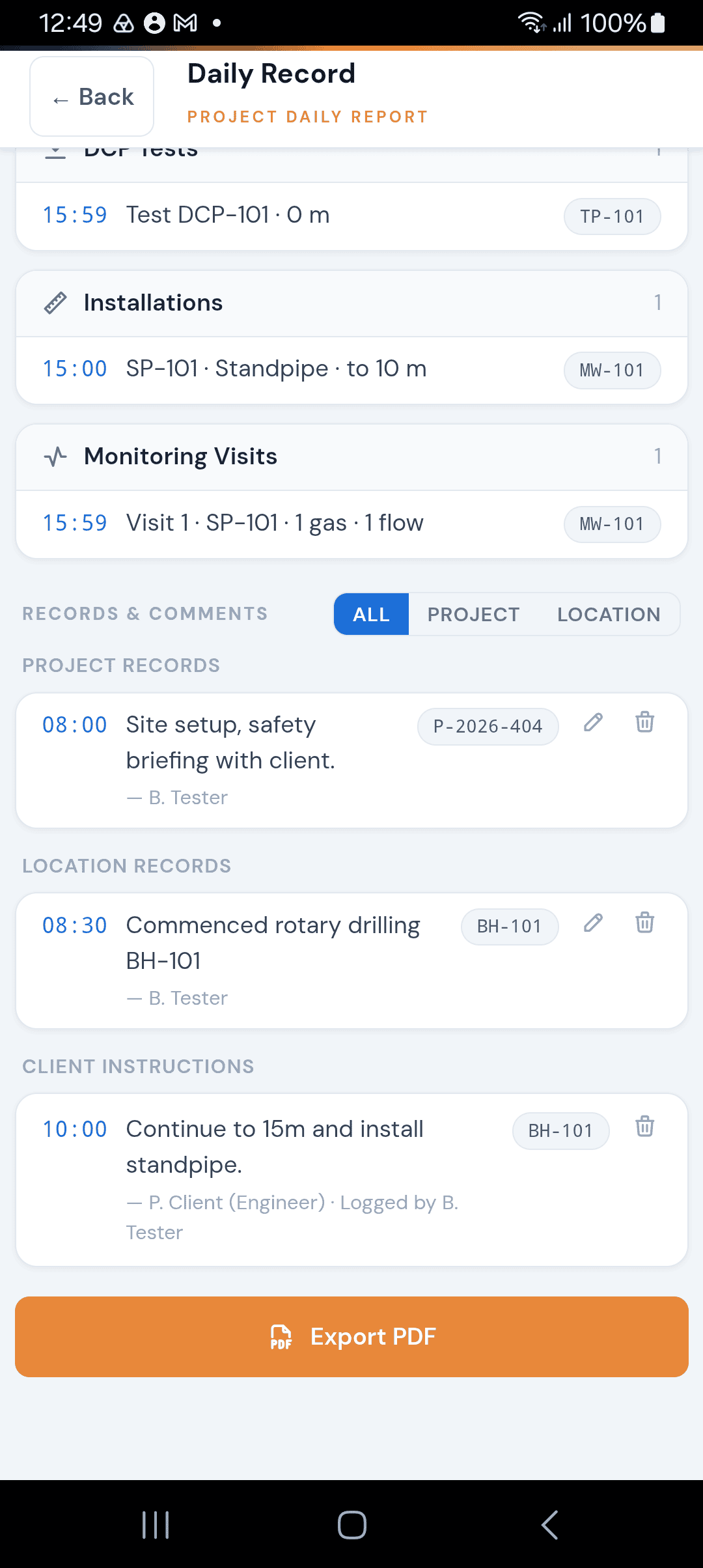
Alongside the work data, the Daily Record also shows:
Item | Description |
|---|---|
Project Records | Project-level time entries such as rig moves, weather delays, health and safety briefings, or any note that applies to the whole project rather than a single location. Each shows a time range, description, and who recorded it. |
Location Records | Location-level time entries such as standing time, waiting on instructions, or location-specific notes. Each shows a time range, description, who recorded it, and which location it belongs to. |
Client Instructions | Any instructions received from the client during the day, showing the time, the instruction text, the client's name and role, and whether it applies to a specific location or the whole project. |
The Header Section
At the top of the Daily Record you will see a summary card with key shift information:
Item | Description |
|---|---|
Project and Project ID | — |
Client name | — |
Date of the record | — |
Logger | Who is recording the data |
Role | Driller, Field Geologist, or Field Technician |
Started / Ended | Shift start and end times |
This information comes from your shift setup. If a field shows a dash, it means the value was not entered when the shift was created.
When Do You See the Daily Record?
The Daily Record appears as part of the End Shift Wizard (covered in the next article). When you end your day, the app loads every record created on today's date and presents them in a read-only review screen. This is your chance to check that everything looks correct before signing and exporting.
You do not need to manually create the Daily Record. The app assembles it from the data already stored in the database. If something is missing from the review, it means the record was either not saved, or was saved with a different date.
How It Exports
When you proceed through the End Shift Wizard, the Daily Record is exported as a signed PDF. The PDF includes:
The header block with project and shift details
All work completed, grouped by category
Project records, location records, and client instructions
Engineer/Geologist and Driller/Operative signatures captured on screen
The PDF is bundled into a ZIP file alongside the AGS data export, ready to share with your office, client, or cloud storage.
Tips
Every record you save during the day feeds into the Daily Record automatically — there is nothing extra to fill in
If a record does not appear in the review, check that the date on the record matches today's date
Project and location records are particularly important for contractual records — make sure you log standing time, delays, and instructions as they happen
The Daily Record only shows data for the current date. Previous days can be reviewed by exporting that day's records
Photos taken during the day appear automatically too, each ending with its file name.


Comments