
Taking Samples — Disturbed, Undisturbed & Bulk

Updated: Sep 30
Samples are a fundamental part of any ground investigation. GneissFox supports two sample entry forms — the general Sample form for disturbed and bulk samples, and the UT Sample form for undisturbed thin-wall tube samples.
The Sample Form (SAMP)
Use this form for all standard sample types — disturbed bags, bulk samples, environmental samples, and more.
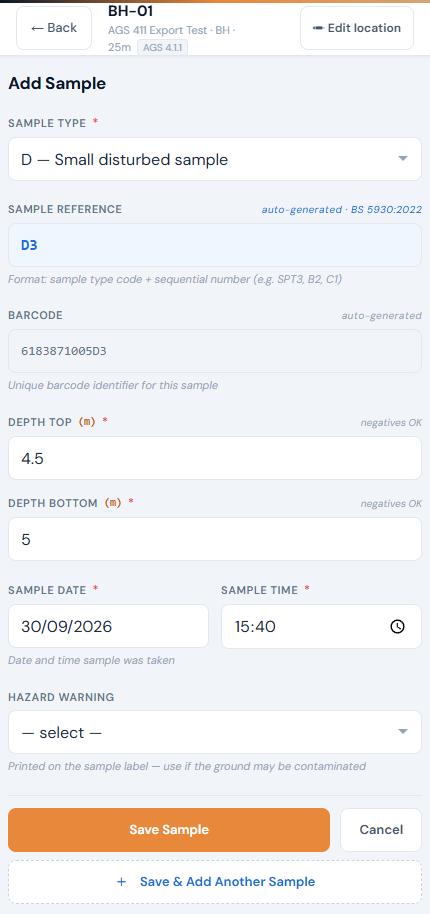
Sample Type
Select the type of sample being taken from the AGS standard list. Common types include B (Bulk/Bag), D (Disturbed), ES (Environmental), SPT (from SPT test), and many more. This is required and drives the auto-generated Sample Reference.
Sample Reference (SAMP_REF)
This is auto-generated and read-only. The format follows BS 5930:2022 — the sample type code followed by a sequential number per location (e.g. SPT1, SPT2, B1, B2). You don't need to type this.
Barcode (SAMP_ID)
A unique barcode identifier is automatically generated for each sample. This is printed on sample labels and used for tracking. It's read-only and auto-generated.
Depth Top and Depth Bottom
The depth interval the sample was taken from, in metres. Both are required. Negative values are allowed for samples above datum.
Sample Date and Time
When the sample was taken. Defaults to today's date and the current time. These combine to form the AGS SAMP_DTIM field.
Hazard Warning
If the ground may be contaminated, select the appropriate hazard type. Options include Chemical contamination, Suspected asbestos, Biological hazard, Radioactive, or Other. This is a BS 5930 requirement for sample labelling, not an AGS field.
Save & Add Another
When adding new samples, you'll see a Save & Add Another Sample button below the main save button. This saves the current sample and immediately opens a fresh form — useful when taking multiple samples in quick succession.
UT Sample Form (Undisturbed Tube)
Use this form for thin-wall tube samples — high-quality undisturbed samples typically taken in cohesive soils for laboratory strength and consolidation testing.
Sample Type
Choose from three tube types:
Item | Description |
|---|---|
UT100 | 100mm thin wall tube (most common for UK SI work). |
UT70 | 70mm thin wall tube. |
UT | Generic undisturbed tube (when the diameter isn't specified above). |
Each type has its own sequential counter, so UT100 and UT70 samples are numbered independently.
Sample Ref and Barcode
Auto-generated as for standard samples — e.g. UT100-1, UT100-2, UT70-1.
Depth Top and Depth Base
The depth interval the tube was driven through, in metres. Both are required. The form automatically calculates and displays the drive length.
Blows to Drive
The total number of blows required to drive the tube to its sampling depth. This is required and must be zero or a positive number.
Date & Time
When the sample was taken. Uses a combined datetime picker. Required.
Hazard Warning
Same as the standard sample form — select any relevant hazard for labelling purposes.
Remarks
Optional notes about the sample — e.g. 'Core loss in top 50mm', 'Sample slightly disturbed during extraction'.
Tips
Your form auto-saves as a draft every 30 seconds. If the app closes unexpectedly, your data will be restored when you reopen the form.
Sample References are sequential per location — if you delete a sample, the numbering adjusts automatically for the next sample.
The barcode printed on labels matches the SAMP_ID stored in the database, making it easy to track samples from site to lab.
For UT samples, record the blows accurately — this data is used for quality assessment of the sample.


Comments