
Soakaway Testing

Updated: Sep 30
Soakaway testing measures how quickly water drains through the ground. The results determine whether a site can use soakaway drainage systems and, if so, how large they need to be. GneissFox follows the BRE Digest 365 method, which is the standard approach in the UK.
How the Test Works
A trial pit is excavated and filled with water. As the water drains into the ground, you take timed readings of the depth to water. The rate at which the water level drops is used to calculate the soil infiltration rate.
The form has two parts: the test setup and results, and the individual timed readings taken as the water level falls.
Test Details
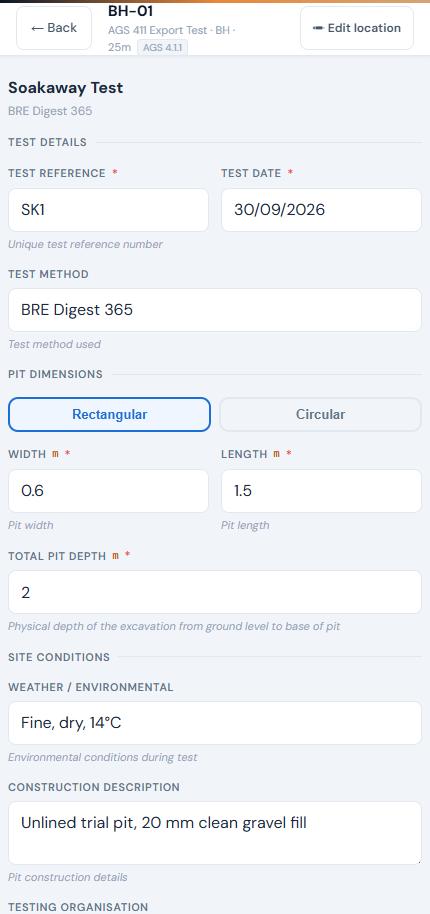
Test Reference
Auto-generated as SK1, SK2, etc. Editable.
Test Date
When the test was performed. Defaults to today. Required.
Test Method
Defaults to 'BRE Digest 365'. Editable if using a different method.
Pit Dimensions
Choose the pit shape:
Item | Description |
|---|---|
Rectangular | Enter Width and Length in metres. |
Circular | Enter Diameter in metres. |
Total Pit Depth
The physical depth of the excavation from ground level to the base, in metres. Required. This is used in the infiltration rate calculation.
Site Conditions
Item | Description |
|---|---|
Weather / Environmental | Weather and temperature during the test, e.g. 'Fine, dry, 15°C'. |
Construction Description | How the pit was constructed, lined, or filled. |
Testing Organisation | Who carried out the test. |
Readings
This is where you record the water level over time. Tap + Add Reading for each measurement.
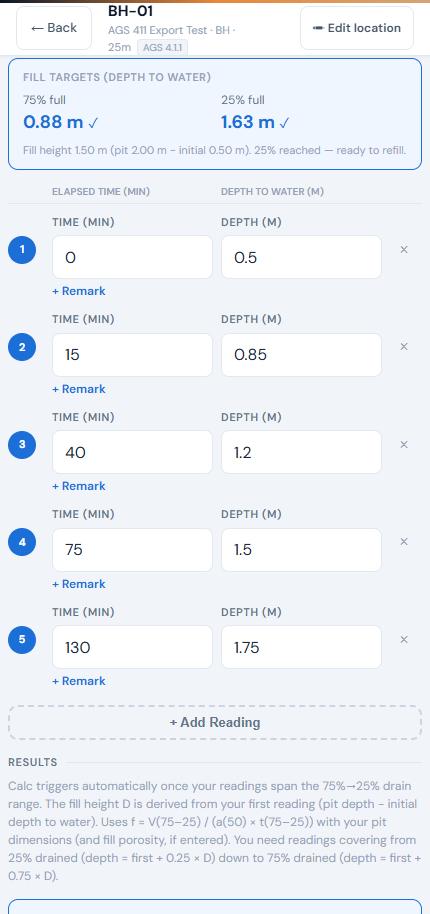
Each reading records:
Item | Description |
|---|---|
Elapsed time | Minutes since the test started (enter as a number, e.g. 0, 5, 10, 15). Readings are kept in time order when you reopen the test. |
Depth to water | How far down the water surface is from ground level, in metres. |
Remark | Optional. Tap + Remark under a reading to add a note to that line. |
Important: Your first reading should be at 0 minutes with the initial depth to water. This sets the fill level that the BRE 365 calculation uses as its baseline.
Fill Targets
Once you've entered the Total Pit Depth and your 0-minute reading, the Fill Targets box shows the depth to water at 75% full and 25% full. Each target gets a tick as your readings reach it, so you know when the timed part of the test starts and when it ends.
The fill height is the Total Pit Depth minus your initial depth to water. When the 25% target is reached, the box shows 'ready to refill' so you can start the next fill cycle.
Final Remark
When you tap Save Test, the app asks for an optional final remark, for example why the test was stopped or whether it needs repeating. It's saved against the last reading. If that reading already has a remark, it's shown so you can edit it.
Results
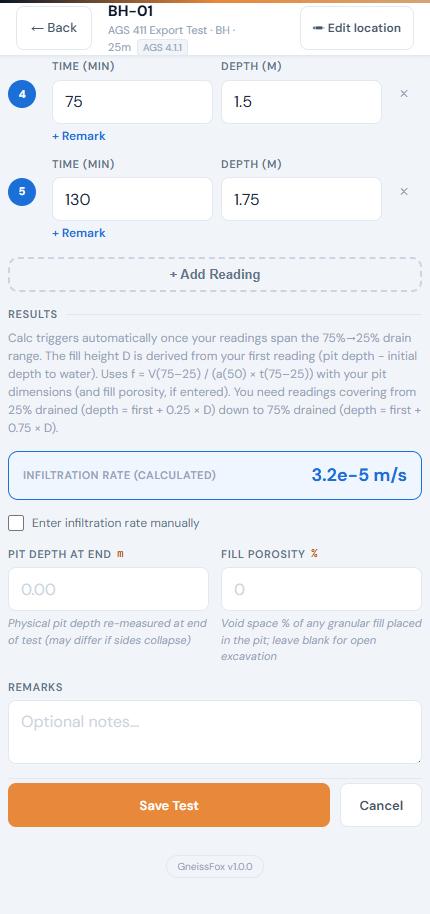
Infiltration Rate
The soil infiltration rate is auto-calculated using the BRE Digest 365 method once your readings span the required range. It uses the full BRE 365 formula: the volume of water drained between 75% and 25% full, divided by the wetted area of the pit at 50% full and the time taken. The pit's base area and perimeter are part of the calculation, so make sure the pit dimensions are entered accurately.
The result is displayed in m/s using scientific notation (e.g. 1.2e-5). If the auto-calculation doesn't trigger, you can tick the 'Enter infiltration rate manually' checkbox and type the value.
Pit Depth at End
Re-measure the pit depth at the end of the test. If the sides have collapsed, this will differ from the start depth. Optional.
Fill Porosity
If granular fill was placed in the pit, enter the void space as a percentage. Leave blank for an open excavation. When entered, the porosity is applied to the pit's storage volume in the calculation.
Tips
Start your first reading at time 0 with the initial water depth — this is essential for the auto-calculation.
Take readings at regular intervals (e.g. every 5 minutes) for the most accurate result.
The BRE 365 method requires readings that span from 75% full to 25% full. If the water drains too quickly, take readings more frequently.
Record weather conditions — heavy rain during the test can affect results.
If the auto-calculated infiltration rate doesn't appear, check that your readings cover the required 75%-to-25% range.
Watch the Fill Targets box. It tells you exactly which depths to time between.


Comments