
Recording Drill Runs — Core, Dynamic & Open Hole

Updated: Sep 29
The Drill Run form is a unified entry point for recording all types of drilling activity in GneissFox. A single form adapts to four run types, showing only the fields each one needs.
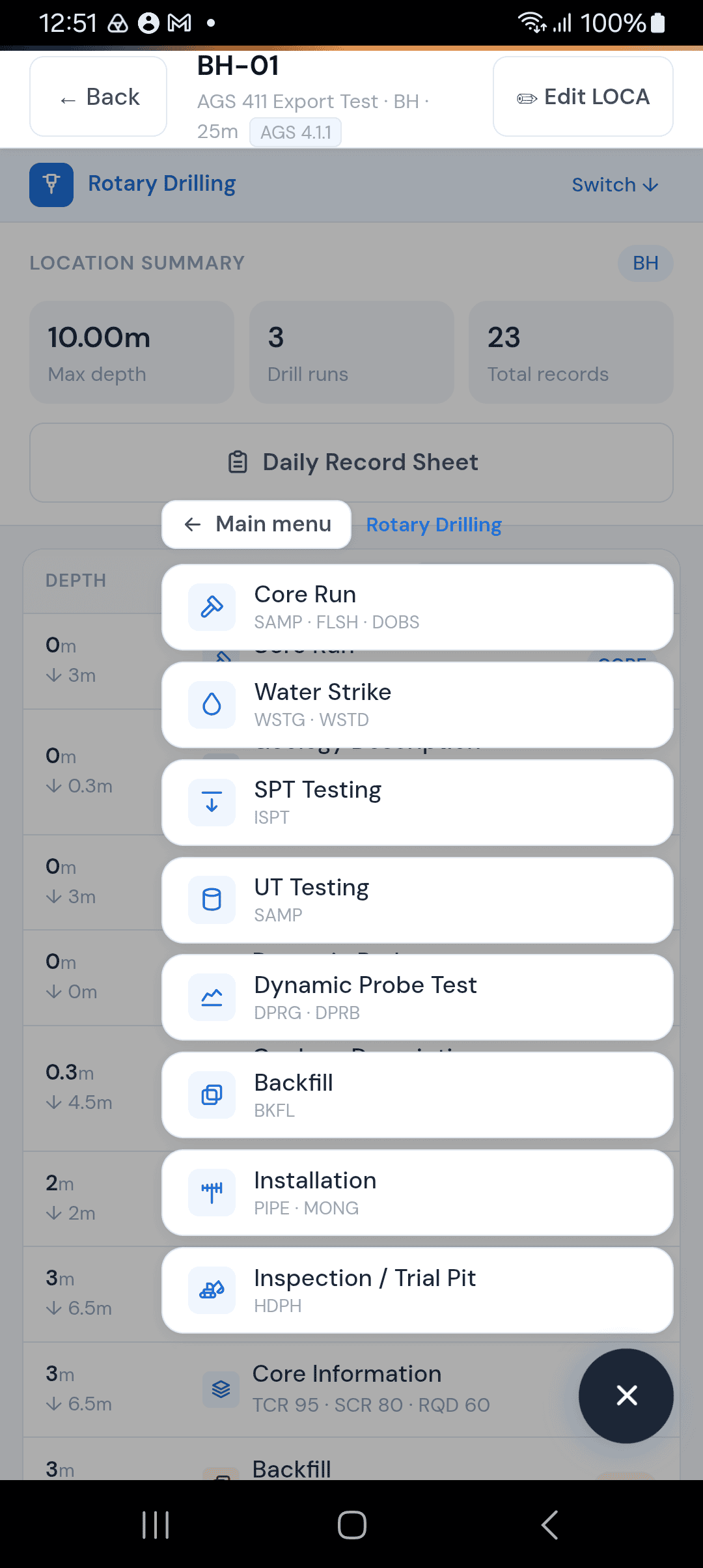
Choosing a Run Type
The first thing you do is select your run type. This determines which fields appear:
Item | Description |
|---|---|
Core Run | Rotary coring. Records the run, the core sample, flush returns and, optionally, casing. |
Dynamic Sampling | Window sampling / dynamic probing for liner samples. Records the run, the window sample and, optionally, casing. |
Open Hole | Rotary open hole drilling with no sample recovery. Records the run depths and timing and, optionally, casing. |
Clean-Out | Cleaning out a previously drilled hole. Records the run depths and timing and, optionally, casing. |
Depths & Timing
These fields appear for all run types.
Depth Top and Depth Base
The start and end depth of this run in metres. Both are required. These depths apply to everything recorded on this form.
Depth Top is pre-filled with the base of the deepest run already recorded at this location, so consecutive runs follow on without a gap. The form flags runs that overlap depths you've already recorded, except for Clean-Out runs, which re-drill existing depths.
Start Time and End Time
The time drilling started and finished for this run, using a 24-hour clock. Both are required. The Duration is automatically calculated in minutes.
If the end time is before the start time, a validation error appears — the form does not assume overnight runs.
Optional Drilling Parameters
Tap Show optional drilling parameters to reveal additional fields:
Item | Description |
|---|---|
Rotation Rate | Drill head rotation in RPM. |
Rotation Speed | Drill head rotation speed in m/min. |
Penetration Rate | Rate of advance in m/min. |
Drill Bit: the type of bit in use, e.g. TC, PDC or Roller. It copies from your previous run, so you only need to change it when you change bits.
These are optional and most commonly used on rotary projects where the client requires detailed drilling parameters.
Core Sample — Core Run Only
When you select Core Run, a sample section appears.
Sample Reference
Auto-filled as C1, C2, C3, etc. (sequential core sample numbering per location). You can edit this if your project uses a different convention.
Barcode
Auto-generated unique barcode for the core sample, used on printed labels.
Sample Diameter
The diameter of the core barrel in millimetres. Defaults to 116mm. Required.
Core Recovery
The length of core actually recovered from this run, in metres. Required. This is compared against the run length to calculate recovery percentage on your logs.
Flush Returns — Core Run Only
Records what came back up the hole when flushing during coring.
Flush Type
What was used to flush the hole. Options include Water, Bentonite, Bentonite Chips, Polymer, Air, Foam, and Mud.
Returns Colour
The colour of the flush returns — Clear, Grey, Brown, Red, Black, White, Yellow, or Other.
Return %
The percentage of flush fluid returned. 100% means full returns; lower values indicate fluid loss into the ground.
No Flush Returns
If there were no flush returns at all (total loss), tick the There were no flush returns checkbox. This disables and hides the flush fields.
Window Sampler — Dynamic Sampling Only
When you select Dynamic Sampling, a window sampler section appears instead of the core sample section.
Test / Run Number
The sequence number for this window sample run. Auto-filled from the next available number.
Sampler Diameter
The diameter of the window sampler in millimetres. Defaults to 200mm. Required.
Recovery
The length of material recovered from this run, in metres. Required.
Casing — All Run Types
The casing section is available for all run types.
If casing has already been recorded at this location, the form shows it, and saving the same casing again won't create a duplicate record.
Casing Depth
The depth of casing at the time of this run, in metres.
Casing Size
The casing diameter in millimetres.
Remarks
Any notes about the casing.
Tips
The form auto-saves a draft every 30 seconds. If you lose connection or the app closes, your data will be recovered next time you open the form.
For Open Hole and Clean-Out runs, only the depths, timing, and optional casing are recorded — there's no sample or flush data.
Core Recovery divided by the run length gives your TCR (Total Core Recovery) — a key metric for rock quality.


Comments