
Inspection Pits

Updated: Sep 25
Inspection Pits and Trial Pits are shallow excavations used to examine near-surface ground conditions. This guide explains how to record pit data in GneissFox.
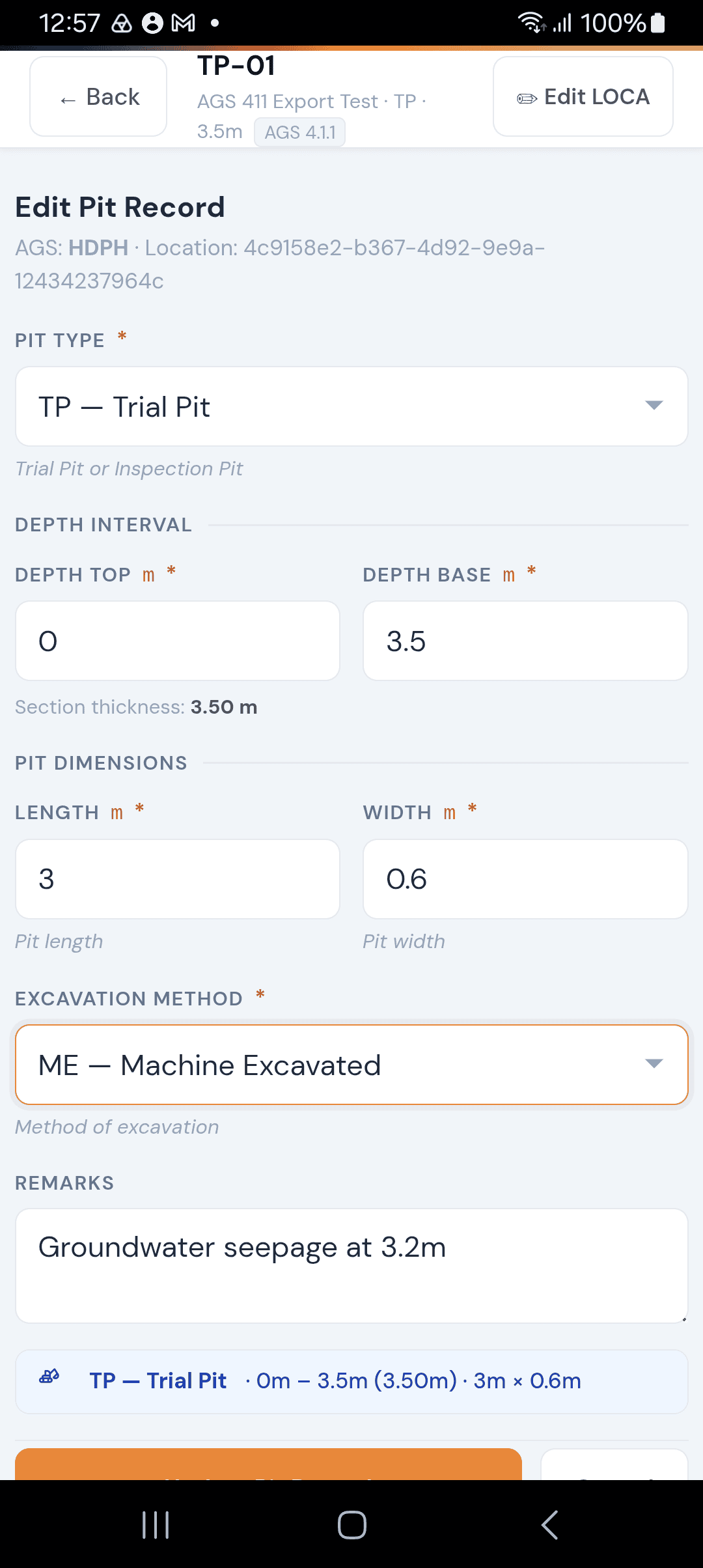
What is an Inspection Pit Record?
In AGS 4.1.1 terms, pit records sit within the HDPH group. Each record captures the pit's type, depth interval, physical dimensions, and how it was excavated.
You create one pit record per excavation. The record is linked to the location you're working at.
The Inspection Pit Form
Pit Type
Select the type of excavation:
Item | Description |
|---|---|
TP — Trial Pit | A machine or hand-dug excavation for sampling and visual inspection of the ground. |
IP — Inspection Pit | Typically a smaller, targeted excavation to examine a specific feature or service. |
This is a required field.
Depth Interval
Depth Top
The depth to the top of the excavation in metres. For most pits this will be 0.00 (ground level). This is required.
Depth Base
The depth to the base of the excavation in metres. This must be deeper than the top depth. This is required.
Once both depths are entered, GneissFox automatically calculates and displays the section thickness (e.g. '2.40 m').
Pit Dimensions
Length
The length of the pit in metres. This is required and must be a positive number.
Width
The width of the pit in metres. This is required and must be a positive number.
These dimensions help define the footprint of the excavation for the record.
Excavation Method
Select how the pit was dug:
Item | Description |
|---|---|
ME — Machine Excavated | Dug using a mechanical excavator (most common for trial pits). |
HD — Hand Dug | Excavated by hand. |
VE — Vacuum Excavation | Material removed using suction (common near utilities). |
OT — Other | Any other method not listed above. |
This is a required field.
Remarks
An optional free-text field for anything else worth noting — e.g. 'Pit collapsed below 1.8m', 'Services encountered at 0.6m', 'Groundwater seepage observed'.
Summary Strip
As you fill in the form, a summary strip appears at the bottom showing the pit type, depth range, thickness, and dimensions at a glance (e.g. 'TP — Trial Pit · 0.00m – 2.40m (2.40m) · 3.00m × 0.60m'). This helps you confirm everything looks right before saving.
Tips
The logger name is automatically filled from your active shift — you don't need to enter it manually.
Depth Top is almost always 0.00 for pits, since they start at ground level.
If your pit is irregularly shaped, use the longest and widest measurements.
You can edit a saved pit record at any time if you need to update depths or dimensions.


Comments