
Dynamic Probe Tests

Updated: Sep 30
Dynamic Probe Tests (DPT) measure soil resistance by counting hammer blows per fixed depth increment. Unlike the DCP which uses ruler readings, a DPT records blows for each standard increment (typically 100 mm) as the probe is driven into the ground.
When to Use
Dynamic probes are used to assess ground strength at depth, often alongside boreholes or trial pits. Different probe types suit different ground conditions and investigation depths.
The form writes to two AGS groups: DPRG (test setup) and DPRB (blow count data per increment).
Step 1 — Test Setup (DPRG)
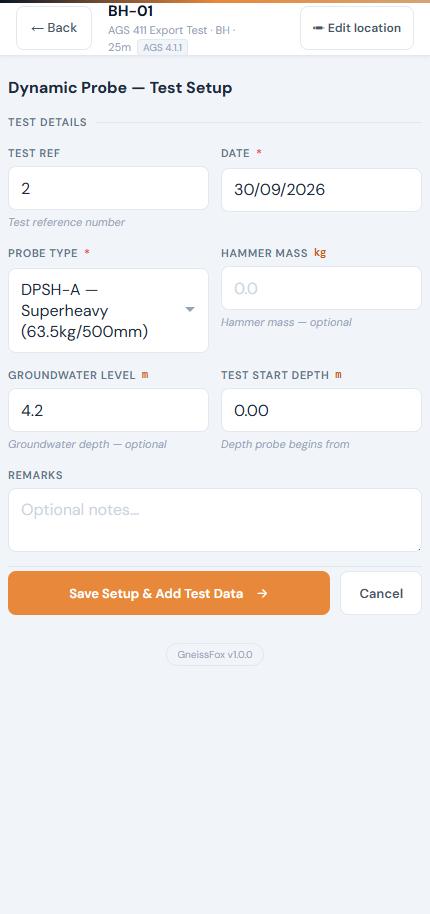
Test Ref (DPRG_TESN)
Auto-numbered. Editable if needed.
Date
Date of the test. Defaults to today. Required.
Probe Type (DPRG_TYPE)
Select the type of dynamic probe being used. The AGS standard defines several types — the searchable dropdown lists all available options. Type to filter. Required.
Hammer Mass (DPRG_MASS)
The mass of the hammer in kg. Optional but useful for the engineer interpreting the results.
Groundwater Level (DPRG_GW)
Depth to groundwater at the time of the test, in metres. Optional.
Test Start Depth
The depth from which the probe begins, in metres. Usually 0.00 unless the probe starts from the base of a pit or borehole.
Remarks
Any notes about the test. Optional.
Step 2 — Data Entry (DPRB)
After saving the setup, you enter data for each depth increment. Each row records:
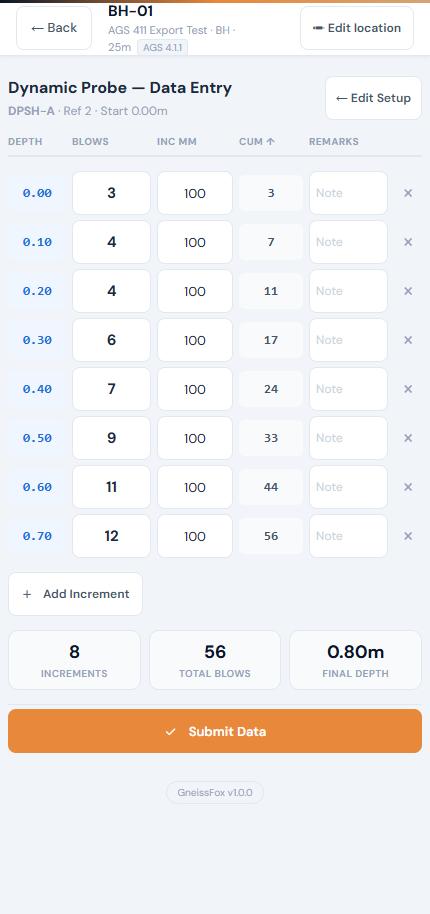
Item | Description |
|---|---|
Depth | Auto-calculated from the start depth and cumulative increments. Shown in metres. |
Blows | Number of hammer blows for this increment. |
Increment (mm) | The depth interval for this row. Defaults to 100 mm. Editable if a different increment is used. |
Cumulative Blows | Running total of all blows to this point. |
Remarks | Per-row notes (e.g. rod change, obstruction). Optional. |
Tap Add Increment to add more rows as the probe advances.
You can delete a row using the × button if entered in error (except the last remaining row).
Running Summary
A summary strip appears once you have data entered, showing:
Item | Description |
|---|---|
Increments | Number of rows entered. |
Total Blows | Sum of all blow counts. |
Final Depth | The depth reached by the last increment. |
Submitting the Test
When finished, tap Submit Data. You'll be asked to select a termination reason — the same options as the DCP form:
Refusal
Target depth reached
Equipment issue
Obstruction
Groundwater encountered
Other (free text)
The termination reason is saved to the DPRG_REET field.
Tips
Use the correct probe type — this affects how engineers interpret the results.
Record the hammer mass if known — it's needed for correlations with soil strength.
If the increment changes mid-test (e.g. switching from 100 mm to 200 mm), edit the increment value for those rows.
Results are typically plotted as blows per increment vs. depth.


Comments